Every track,tuned.
DynaKon is a free Chrome extension that fixes the EQ and volume of whatever you play, then shows you exactly what it changed.
Free. No account. Runs on your device.
 DynaKon
Press and hold to hear what the tuned curve is changing.
It fixes what's wrong with the mix.
Every track is mastered differently, and every speaker colors the sound. DynaKon listens to each track as it plays and moves the EQ the other way. These are demo curves.
Thin sound
Laptop speakers and cheap earbuds lose the low end. DynaKon brings the bass back without turning it to mud.
Boomy bass
Bass-heavy mixes can swallow vocals. DynaKon pulls the low end back so voices come through.
Harsh highs
Bright masters can tire your ears. DynaKon eases the highs where they bite.
Uneven volume
Quiet tracks come up and loud ones stop jumping out, and peaks stay clean, so you stop reaching for the volume.
For people who care how it sounds.
DynaKon is built to be heard and checked, not taken on faith. You can see every change it makes, switch it off in an instant, and set how much it does.
See every move
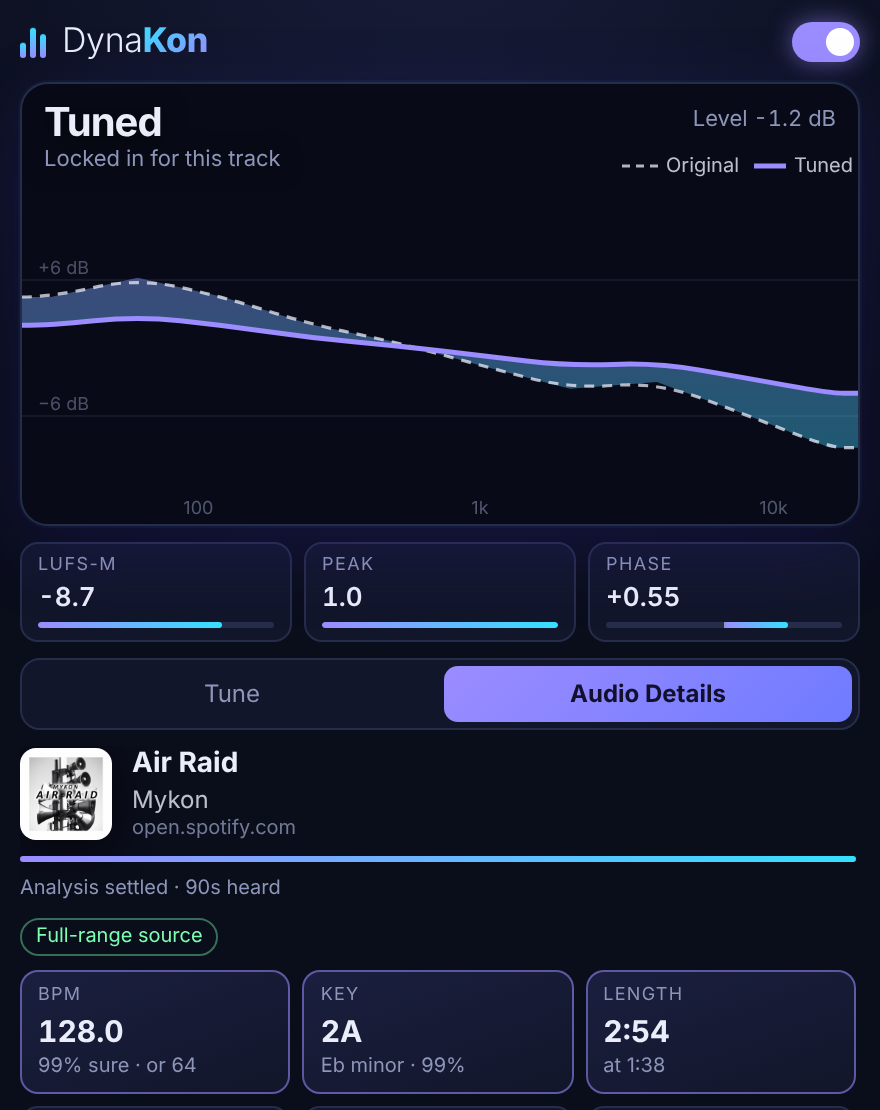
The graph overlays the original spectrum with the tuned curve, so you can read exactly which bands changed and by how much.
A/B in one press
Hold for original drops the processing so you can compare the tuned sound against the source, then let go to hear it again.
You set the strength
Choose Subtle, Balanced or Bold. Turn volume leveling off, or set the small-speaker bass boost to Off, if you want tone correction only.
Peaks stay clean
A look-ahead peak guard catches loud moments before they clip, so leveling never costs you headroom.
Check the source
Audio Details shows bandwidth and a lossy-source check, so you can tell a full-range file from an upsampled one.
Real readouts
LUFS, peak, loudness range, stereo width and mono compatibility, measured live as the track plays.
Readouts are estimates, and DynaKon is a corrective tool rather than a mastering chain. It works on the sound that is playing in your browser.
Know the track before you play it.
Open the Audio Details tab for readouts that DJs and producers use every day.
- BPM and keyCamelot notation
- LoudnessLUFS, peak, loudness range
- StereoWidth, balance, mono compatibility
- Source qualityBandwidth and lossy-source check
BPM, key and loudness figures are estimates.
Works on its own, with one exception.
On YouTube and most sites, DynaKon starts by itself. A few music services lock their audio so extensions can't read it. When that happens, DynaKon says so, and one click on Not Tuned tunes that tab.
DynaKon never bypasses or removes copy protection. It only adjusts sound that is already playing.
- Not TunedClick to start, or to look for audio again
- ListeningAnalyzing the track
- TunedThe EQ and level are fitted to this track
Your audio stays on your device.
DynaKon analyzes sound inside your browser and sends nothing anywhere.
- Never recordedAudio is processed live, then discarded
- No network requestsThe extension never phones home
- No account, no ads, no trackingNothing to sign up for
Better sound,one click away.
Add to ChromeFree. Reload tabs you already have open after installing.